Workout video maker, no photo needed
Create a portrait workout video directly from your activity and saved visual choices, with no starting photo or prompt to write. You can also animate an original or generated photo with your selected style, effects, and stats while keeping that image's orientation.
Available now on iOS and Android. Free to start, no credit card, just a Google or Apple sign-in before your first creation.
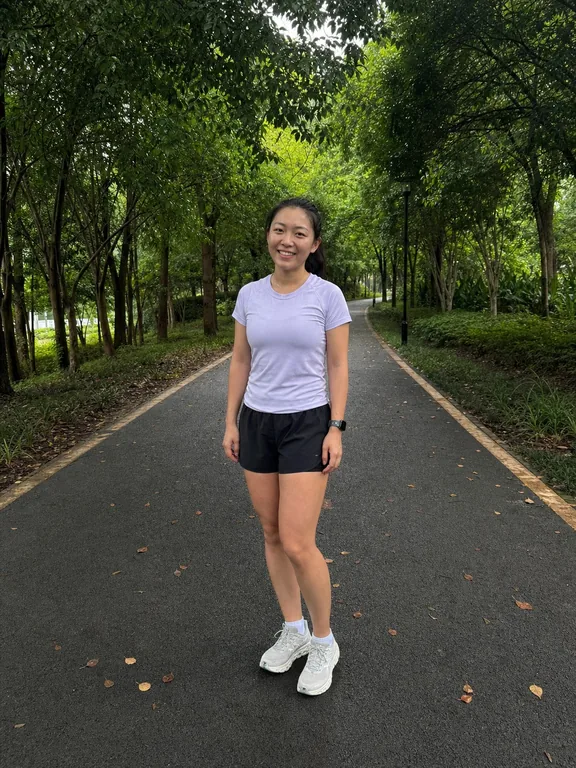
Watch an image-to-video result
Animate photo under Video can start from one original or generated photo. The stills show the original alley selfie and the selected beach look, while the three-second clip shows that look in motion. The current flow uses the uploaded photo as a visual reference instead of forcing it to appear as the first frame.
Before & after examplesTurn your next workout into a video
Every ActivArt account starts free, with an allowance of images, animated videos and on-device route videos that refills on its own. You need a Google or Apple sign-in before your first creation, and free creations carry the ActivArt mark. No credit card needed to start.
How it works
Set the look once
Choose your framing, athlete appearance, gear, scenery, weather, lighting, mood, art style, and colour palette. ActivArt saves those choices, so there is no video prompt to write.
Choose how to start
Under Video, choose Create from a blank canvas to make a clip without a photo. To begin with a photo, select one original or generated image and choose Animate photo.
Come back when it is ready
The video continues as a recoverable job if you leave the screen. ActivArt notifies you when it is ready to preview, save, and share.
Create a portrait video without a photo
Your activity type and saved visual choices describe the athlete, setting, camera, and style. ActivArt turns that concept into a portrait clip directly, without uploading a starting image.
Transform an original or generated image
Choose one photo as a visual reference. ActivArt applies the selected style, effects, activity controls, and stats while creating the video, without requiring the uploaded photo to appear as its first frame. The source orientation is retained.
Your choices stay aligned
Photo-free video uses the same framing, appearance, gear, scene, weather, light, mood, style, palette, and custom visual note that guide photo-free artwork.
Carry your selected stats into video
When stats are enabled, both video paths use your selected figures, custom labels, placement, and visual treatment, with instructions to keep every character stable through the clip.
Free to try
The Free plan includes a limited video allowance. Premium includes more, and the Membership page shows your current usage and reset time.
Private while it renders
Photo-free generation sends no image. When you animate an image, it is stored privately only while the job runs, then deleted. The finished private video remains briefly available so an interrupted download can resume.
Clear provenance
ActivArt adds signed machine-readable provenance to the finished video. This identifies its AI origin without adding account details, activity stats, or location to the marker.
Built for short-form sharing
Photo-free video uses a portrait canvas ready for vertical feeds. A video made from a photo follows the source image, so its framing stays familiar.
Animated video or route video?
Choose animated video when you want one artwork to move. Choose a GPS route video when the shape and progress of the route matter, or an elevation video when the climb is the story. Route and elevation videos are rendered on your device and use a separate allowance.
Explore more
Turn your next workout into a video
Available now on iOS and Android. Free to start, no credit card, just a Google or Apple sign-in before your first creation.